This morning I had an epic fail with a student who needed to format a history paper with page numbers in the format: [her last name] p#. The tricky aspect was that there was not supposed to be a page number on page one. We went through a ridiculously cumbersome process of making section breaks, trying to get the format different on page 2 and beyond. We never succeeded and instead reformatted and printed each page separately. Unfortunately, she was 15 minutes late to class.
So I was on a mission to find the most elegant way to achieve this. The Word help menu actually did help. As always there are multiple ways to do a job in MS Office, but this is the simplest way I found:
From the Insert Ribbon, choose Page Number from the Header and Footer section (toward the right). At that point you can choose styles for page numbers; for me that was a top of the page, right justified, plain number. BUT as soon as I chose that, I could edit and add name before number, which wonderfully then showed up on each of the next consecutively numbered pages. The problem was that page one still had the unwanted page number. The solution is way too simple. Using the Header Footer tools, just click the box that says Different First Page.
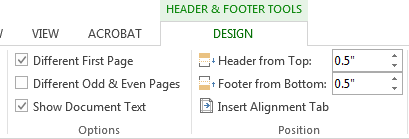
Then I could go to the page one header and add the course name and number, instructor name, full student, or anything else desired without messing up the numbering in the rest of the document.
A small problem occurred because page numbers also mysteriously appeared in the footer. To get rid of them, click in the footer to activate header & footer tools; choose footer on the left side of that ribbon, and select remove footer. If a student has content such as footnotes in the footer, I don't know what the solution would be, since the remove page numbers command erases everything I worked so hard to perfect. Arrgh!
If any of you has similar little lessons to share which would help with tasks students frequently ask about, PLEASE send them to me or post directly to the blog. If would be wonderful to someday take enough training to be a Microsoft product pro, but until then, let's help each other. THANKS!
Wednesday, November 18, 2015
Tuesday, November 17, 2015
E-books
A very short survey of reference librarians here tells me that we don't get many queries about ebooks, but just in case you get some, here is a replica of a handout with lots of helpful links (checked for currency today).
Books, Books,
E-books, & More Books
Library homepage: http://depts.gpc.edu/library/
GIL Find: http://gilfind.gpc.edu/
(GPC)
GIL Find U: http://gilfinduc.usg.edu/
(USG)
Get Your PIN: http://depts.gpc.edu/library/pins.html
Tutorials: http://guides.gpc.edu/Tutorials
Ebsco Download Instructions: http://support.ebsco.com/training/flash_videos/eBooks/ebooks_downloading/ebooks_downloading.html
E-books for Mobile: http://guides.gpc.edu/mobile_ebooks
Ebsco Apps: http://bit.ly/1QJVMHL
E-books can be found in GIL-Find catalog or with Discover GALILEO. They can be browsed or searched in the following databases:
Ebooks on Ebscohost requires current GALILEO pw. Only 1 check
out. No holds.
Academic Ebooks on Ebscohost requires GPC login and
password. Unlimited check outs.
OneClick Digital requires GPC login and password. E-books AND audio books. Unlimited check outs. Instructions for OneClick are on this page: http://guides.gpc.edu/mobile/audio.
A full list of databases with ebooks is on Sonya's guide:
Labels:
audio books,
e-books,
electronic resources,
tutorials
Friday, November 13, 2015
Career Services
If you get questions from a company about wanting to advertise jobs/internships on our campus, you can refer them to Adelaide Richardson - adelaide.richardson@gpc.edu 770-274-5123.
Students need to use the careerservices@gpc.edu email address to set up appointments to get career counseling.
Tuesday, November 3, 2015
Libraries Transform Notecards
Tamika has left a stack of notecards from ALA's Libraries Transform campaign on the ref desk. Feel free to use as fancy notepaper.
Wednesday, October 28, 2015
Access Science
There are promotional brochures at the desk for Access Science, one of our newest licensed databases. You can find it in the A-Z index in GALILEO or here is a direct link:http://www.galileo.usg.edu/express?link=accq-dek1
The database has the content of the multi-volume print McGraw-Hill Encyclopedia of Science, plus some enhancements that are possible in the digital format such as digital animations and hyperlinks to cited and supplemental material.
This license was requested by science faculty from Alpharetta as part of a grant proposal, so you might have students inquiring about it.
Please try it out and feel free to record any comments or tips in the comments section.
The database has the content of the multi-volume print McGraw-Hill Encyclopedia of Science, plus some enhancements that are possible in the digital format such as digital animations and hyperlinks to cited and supplemental material.
This license was requested by science faculty from Alpharetta as part of a grant proposal, so you might have students inquiring about it.
Please try it out and feel free to record any comments or tips in the comments section.
Tuesday, October 6, 2015
New ProQuest Databases
As part of the GSU consolidation, GPC students will gain access to some new databases.
The first to arrive are from ProQuest, which can be accessed as individual databases or collectively under the ProQuest Central platform. We already have Nursing and Allied Health Sources, which is a favorite of our Dental Hygiene students. Articles are already loaded into Discover GALILEO and can be accessed with the Find It button. New titles for us are listed below.
ABI/INFORM Complete
Banking Information Source
Biology Journals (ProQuest)
Canadian Business and Current Affairs Complete (CBCA)
Canadian Newsstand (ProQuest)
Criminal Justice (ProQuest)
Environmental Science Collection (ProQuest)
Family Health (ProQuest)
Health and Medical Complete (ProQuest)
Health Management (ProQuest)
Hoover's Company Profiles
OxResearch (ProQuest)
Pharmaceutical News Index
Political Science (ProQuest)
ProQuest Asian Business & Reference
ProQuest Career and Technical Education
ProQuest Computing
ProQuest Education Journals
ProQuest European Business
ProQuest Military Collection
ProQuest Newsstand
ProQuest Nursing & Allied Health Source
ProQuest Religion
ProQuest Research Library
ProQuest Social Science Journals
ProQuest Telecommunications
Psychology Journals (ProQuest)
Science Journals (ProQuest)
Snapshot Series (ProQuest)
Sociology (ProQuest)
ProQuest does a great job with training materials. Here are some options for webinars: http://bit.ly/1JQcpcU Scroll down the page to see the recorded training from October 6th.
Have fun exploring the new resources and feel free to add any tips and tricks you discover in the comments below.
Tuesday, September 29, 2015
Equipment Checkout for Faculty Available
Faculty are now available to check out equipment such as digital cameras, iPads and more. The link below will give you more information about how to reserve the items and when you can pick them up.
http://technology.gpc.edu/teaching-learning/services-programs/equipment-checkout/
Subscribe to:
Posts (Atom)
