Wednesday, January 7, 2015

ASK ME (YOU)

As the new semester begins, many students need help finding essential services.  Though there are official "ASK ME" volunteers around campus, students often look to the library for answers. (Yay!) Please consider wearing an "ASK ME" button while you are at the desk. 

There is a copy of the updated campus map at the desk as well as a list of FAQs. Listed below are the important numbers to call for questions you don't know how to answer.


Important Numbers and Resources
For general information regarding your questions, contact information is listed below.

Resources and Information
Academic Calendar:

Admissions Status Check:  gpc.edu/mystatus
Sign up for text alerts. Upload admissions documents.

Financial Aid Status Check

Forgot your Login?  Go to Get My Login.

Questions? Ask GPC (frequently asked questions)

Student Information System – SIS
Your personal records:  https://sis.gpc.edu

TAGs-Transfer Admissions Guarantee program

Tuition, Fees, and Refunds

Withdrawals vs. Drops

Departments

Public Safety:
EMERGENCIES:  770-274-5511
Non-Emergencies:  770-274-5500

Bookstores

Disability Services

GPC Online/iCollege
gpc.edu/online   678-891-2805

Learning Resources Centers (Libraries)

Learning and Tutoring Centers

Service Desk for Technology Issues
678-891-3460 or servicedesk@gpc.edu

Testing


Please note:  Due to federal law and for your safety, specific information regarding your records cannot be given over the telephone. Please be prepared to come to an office for assistance and remember to bring your GPC-ID card.


Legend:
Testing: Testing Center
LTC:      Learning and Tutoring Center
ESL:      English as a Second Language
LRC:     Learning Resources Center (Library)

FOR:
·   Advising, Counseling, & Retention Services
·   Enrollment & Registration Services (or visit www.gpc.edu/selfservice to email)
·   Financial Aid
·   GPC Online (or email gpcol@gpc.edu)
·   Student Accounts

Call 678-891-3535 (Try the self-service option for answers to common questions-available 24/7.)


FOR:
Testing – All campuses: Call 678-891-3700 or visit www.gpc.edu/selfservice to email

International Admissions and Advising: Call 678-891-3235 or issa.gpc.edu


Military Outreach Center
Clarkston Campus, Building CH, Suite 1300


Dunwoody Phone Numbers
Bookstore:          678-891-5170
Tutoring:             770-274-5244
Eng. 2nd Lang:   770-274-5180
Library:               770-274-5085

Wednesday, December 3, 2014

NPR Book Concierge

In case you haven't "heard," National Public Radio is now in the readers' advisory business.  Sure they frequently had Nancy Pearl on for guest spots to review books, and they've run lists of best books since at least 2008. But for 2013 and 2014 they have an interactive service called "NPR's Book Concierge."

There are 27 filters that can be used and combined to narrow the recommendation. It's a fun little tool to use whether you're looking for a good read over the holidays or finding something recent that matches a patron's interests. (Remember that NoveList is one of our databases that will also help you find books with very specific interests.)

It would be a great project to compare NPR's best list with GPC holdings and send a list to Angiah for collection development. Anyone interested?

Downloading e-books on Mobile Devices - From Sonya

On 11/20/2014 Sonya emailed: We are receiving more and more questions about downloading e-books in chat and at the reference desks, so I want to make sure that we are all on the same page in answering them. 
All EBSCO e-books including former Netlibrary e-books can be downloaded on a user’s device for off-line viewing. Steps will vary slightly if downloaded on a computer or a mobile devices.
For all users: (this is only done once, the first time a user downloading a book)
           - Create ebsco personal account  
           - Create Adobe digital id (adobe digital id created to use with other adobe products, or for public library books, can be used)

For computer users:
      - Install Adobe Digital Editions
      - Authorize Adobe digital editions with your Adobe ID

For tablet users (will work on iOS, and Android devices including Kindle Fire) – one time step         
         - Install BlueFire Reader
     -   Authorize BlueFire Reader with your Adobe Digital ID

Once it is done, the process is seamless because a computer/ device will remember what program to use, etc.

 EBSCO e-books CANNOT be downloaded on library computers or any computers on campus.

If a user clicked Download by mistake they can e-mail the file to themselves and open it at home with Adobe Digital editions or they can sideload it to their compatible device (connect a device with a computer and drag a file to a downloads folder on a device).

Also if they were logged into their EBSCO account, the selected book will stay in their EBSCO folder, so they can download it at home without having to search for it again.

The default check out period for EBSCO e-books is 7 days. Books expire after 7 days, they do not need to be returned.

We have a variety of instructions for different devices at http://guides.gpc.edu/mobile_ebooks
Please let me know if you have any questions or need additional explanations. 
Thank you!  sonya

Wednesday, November 5, 2014

Hanging Indent

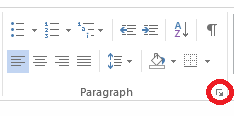
Lots of research papers are being printed these days.  A frequent question is how to make a hanging indent in MS Word. Remember that MLA citations are double spaced, so make sure the format of the paper/page is established at that line spacing. Then highlight the citations to be formatted and click on the small arrow in the lower right of the paragraph section on the top ribbon.
A dialog box will open.  You'll need to find the window labeled "special" and choose hanging. You can also make sure that line spacing is correct and the .5 indent is selected. Then click OK at the bottom of the page.

Voila! Hanging indents without tons of tabbing.

Wednesday, October 1, 2014

Help for Student Laptops

Today a student came in with his laptop in recovery mode just as he needed to finish and print a paper.  Of course, it's a painful lesson in copying work to flash drives or mailing it to yourself to not lose any data, but I also wish I knew more and could have helped him.  (Carmel was out with a sick baby, so I couldn't appeal to our cyber expert.) He had already been to the lab in E building, but they couldn't help him and sent him to us. This brings up two things for us to remember:
  1. Do not touch a student computer because in doing so, you may incur liability for your actions.  This is also official OIT policy in the labs, though they are often able to talk students through to a solution.
  2. OIT has a service called techSPOT which offers direct support for student laptops.  The trouble for us is that it's only available on Clarkston and Newton campuses and only Tuesday and Wednesday from 10 AM to 2 PM. URL http://www.gpc.edu/oit/jagspot/techspot
Since I didn't remember the hours of techSPOT for the student who was panicked and in a hurry, I gave him the Service Desk number (678-891-3460) and told him he might need to go to Clarkston. Thankfully, it's Wednesday, and hopefully he could get the help he needed.

Friday, September 26, 2014

GPC Libraries in GLA Spotlight

The Georgia Library Association (GLA) features the Georgia Perimeter College Libraries in the spotlight this month.  For more, visit he GLA homepage and/or the GLA blog.